
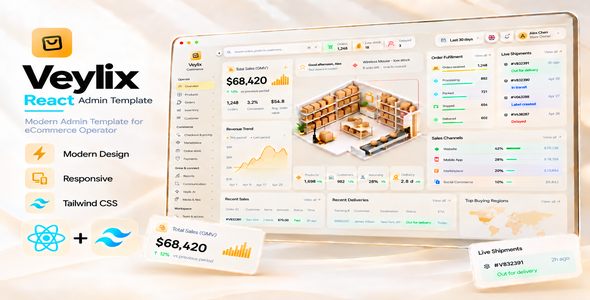
Veylix — React eCommerce Admin Dashboard Template
Veylix is a modern, responsive eCommerce operations admin dashboard built with React 19, TypeScript 7, Tailwind CSS 4, and Vite 8. Designed for online stores, commerce teams, marketplaces, inventory operations, order management, reporting, customer workflows, and customizable business administration interfaces.
The React edition preserves the distinctive warm glass-inspired visual system of Veylix while providing React-owned pages, typed routing, reusable components, structured demo data, responsive layouts, and shared commerce service workflows. It includes 99 React-owned application routes and 14 compatibility aliases.
Why Veylix?
- Modern eCommerce-focused dashboard design with a premium warm-neutral interface.
- 99 React-owned application routes across commerce operations, store management, and administration.
- React 19 + TypeScript 7 with reusable functional components and typed application code.
- Tailwind CSS 4 + Vite 8 for styling, development, and production builds.
- Responsive layouts for desktop, tablet, and mobile screens.
- Clean browser URLs such as
/overviewand/commerce/orders. - Reusable React components, data schemas, and service layers for easier customization and backend integration.
- Manrope variable font, local interface assets, Chart.js, and Phosphor Icons.
- Five interface languages with Arabic RTL support.
- General branding settings for browser title, favicon, sidebar logo, main logo, store information, and contact details.
- Optional server-side AI adapter example that keeps private credentials out of browser code.
Overview Dashboard
Veylix includes a commerce operations overview with structured demonstration data and practical insights, including:
- Total sales / GMV summary
- Revenue trend visualization
- Order fulfillment progress
- Shipment-status demonstration cards
- Sales channel performance
- Products, customers, returning customer rate, and delivery metrics
- Recent sales and recent deliveries
- Top buying regions
- Top products
- Inventory status and low-stock alerts
- Payment method distribution
- Quick commerce actions
Scoped live Store Health: The warehouse illustration’s activity signals and Store Health respond to changes in current browser-local commerce records. Other dashboard cards, tables, and charts retain their supplied demo or period-based presentation; they are not a server-connected real-time reporting service.
Catalog & Product Management
- Products and dedicated create/edit workflows
- Seven-step Product Details editor: Information, Media, Catalog, Pricing, Inventory, Shipping, and SEO & Visibility
- Variants and options
- Categories with cover/thumbnail media and SEO metadata
- Attributes
- Brands
- Collections
- Tags
- Reviews and ratings
- Product images, gallery management, and optional video
- Pricing, stock, shipping, product relations, and visibility settings
Orders & Operations
- Orders
- Fulfillment queue and shipment tracking
- Returns
- Refunds
- Cancellations
- Abandoned checkouts
- Customers and customer segments
- Operational activity and status workflows
Inventory Management
- Inventory and stock availability
- Warehouses
- Stock transfers
- Replenishment
- Stock adjustments
- Suppliers
- Low-stock monitoring
Commerce & Pricing
- Checkout and pricing
- Payment methods and transaction workspaces
- Coupons and discounts
- Promotions
- Gift cards
- Campaigns
- Store channels
Marketplace
- Vendors
- Vendor applications and product approvals
- Vendor orders
- Commission rules
- Vendor payouts
- Disputes and marketplace policy
Online Store Content
- Navigation
- Pages
- Blog posts with integrated Blog Category management
- Testimonials with integrated Testimonial Category management
- Locally uploaded featured and testimonial images
- Contact messages
- Popups
- FAQs
Reports & Analytics
- Sales reports
- Order reports
- Product reports
- Inventory reports
- Customer reports
- Return reports
- Channel reports
- Payment reports
- Vendor reports
- Marketing reports
Communication
- Unified inbox
- Support tickets
- Email drafts
- Email templates
- Notifications
AI Workspace
Veylix includes optional frontend AI-assisted workflow interfaces for:
- Product copy drafting
- SEO drafting
- Support drafting
- Catalog review
- Voice and image context
- Knowledge, prompts, rules, and usage history
An optional Node.js server-side AI adapter example is included for integration. Manual editing and the core admin template do not require an AI provider account.
Workspace & Administration
- Media and files
- Users
- Roles
- Permissions
- Teams
- Audit activity
- Integrations
- Webhooks
- Settings
General Settings & Branding
The General Settings area allows buyers to customize common branding values directly from the interface:
- Store name
- Browser / tab title
- Favicon
- Sidebar logo
- Main site logo
- Tagline
- Support email
- Phone
- Address
Default Veylix branding artwork is supplied and can be replaced for your own store or application.
Responsive & Accessible
- Responsive desktop, tablet, and mobile layouts
- Responsive table handling
- Keyboard focus and dismissible menus
- Semantic tables and labelled form fields
- Dialog semantics
- Skip navigation support
- Reduced-motion support
- Reduced-transparency preference support
- Arabic RTL layout support
Technology Stack
- React 19.3 and React DOM
- TypeScript 7
- Tailwind CSS 4 with the @tailwindcss/vite plugin
- Vite 8 and @vitejs/plugin-react
- Chart.js
- Phosphor Icons
- Manrope Variable Font via Fontsource
- SVG world map
Getting Started
Install a compatible Node.js version (20.19+ on the Node 20 line or 22.12+) and npm. After extracting the buyer ZIP, open a terminal inside the veylix-react directory containing package.json.
npm install
npm run dev
For validation and production builds:
npm run typecheck
npm run verify
npm run build
npm run preview
The development server runs locally with Vite. npm run build generates the deployable dist/ directory; compiled production files are not prebuilt in the source ZIP. The application uses @tailwindcss/vite and does not require an extra postcss.config.mjs file for Tailwind integration.
Buyer-Friendly Source Structure
src/app/                         React application shell
src/pages/                       React route host and page composition
src/hooks/                       React state and navigation hooks
src/components/react/layout/     Sidebar and topbar components
src/components/react/dashboard/  Dashboard components
src/components/react/commerce/   Commerce pages, editors, and dialogs
src/components/react/ui/         Reusable React UI primitives
src/data/                        Navigation, schemas, and demo records
src/services/                    Persistence, validation, and workflows
src/styles/                      Tailwind styles and responsive rules
src/router.ts                    Typed clean-URL routing helpers
public/assets/                   Local images, logos, and map assets
server/                          Optional server-side AI adapter example
documentation/                   Installation and customization guide
scripts/                         Local verification tools
Clean URLs & Deployment
Veylix uses typed React routing helpers and the browser History API for clean URLs. Production hosting must provide an index.html fallback when application routes are loaded directly. The package includes a Vercel configuration and Apache fallback rules.
- Example route:
/overview - Example route:
/commerce/products - Example route:
/commerce/orders - Optional subfolder deployments via
VITE_BASE_PATH
Easy to Customize
React components, route labels, demo records, design tokens, styles, reusable UI primitives, and commerce services are separated into understandable folders. Adapt them for your own commerce administration interface or connect the existing frontend to your own backend APIs and database.
What You Get
- Editable React + TypeScript + Vite + Tailwind CSS source
- 99 React-owned application routes with 14 compatibility aliases
- Dedicated product create/edit workflow
- Commerce workspaces, dialogs, tables, and dashboard components
- Structured local demonstration data and browser-storage workflows
- HTML documentation, README, and changelog
- Third-party license notices and asset policy
- Default Veylix favicon, logo, product sprite, and warehouse demo artwork
- Optional AI adapter example
- Vercel and Apache clean-URL deployment configuration
- Verification scripts for source and build checks
Important Note
Veylix is a frontend React admin template, not a complete hosted eCommerce backend. Included records, sample transactions, and settings are demonstration data persisted in browser Local Storage / IndexedDB where applicable. Production authentication, authorization, payment processing, messaging, durable database storage, and third-party integrations require your own secure backend and provider connections.
The warehouse Store Health and activity indicators are browser-local, data-derived demonstrations, not a live cross-device monitoring connection. Optional external Server-Sent Events support may supplement warehouse activity when connected to your backend.
Assets: The downloadable source package includes local product and warehouse demo artwork, Veylix logos, and a world map. Please review the included asset policy and third-party notices; any replacement or additional preview artwork must be appropriately licensed. Do not assume that marketplace preview images outside this buyer package are included.
Credits
- React / React DOM — MIT License
- TypeScript — Apache License 2.0
- Vite / React Vite Plugin — MIT License
- Tailwind CSS — MIT License
- Manrope — SIL Open Font License 1.1
- Phosphor Icons — MIT License
- Chart.js — MIT License
- svg-maps/world — CC BY 4.0 (attribution in included notices)
Veylix — React eCommerce Admin Dashboard Template
Modern commerce operations, React + TypeScript architecture, responsive design, and practical admin workspaces — ready to customize for your next eCommerce interface.

Official Product Support
Purchased Veylix on ThemeForest and need assistance?
Use the official ThemesDeveloper Support Center to verify your eligible ThemeForest purchase and request product support.
- Product documentation and usage guidance
- ThemeForest purchase verification
- Technical support tickets
- Reported product issue assistance
- Update and compatibility guidance
Open ThemesDeveloper Support Center →
Support is provided according to the applicable Envato Item Support Policy and the buyer’s active support period.