
Good to Know
This template is designed primarily for mobile devices. For the best experience, open the live demo on your smartphone.

Overview
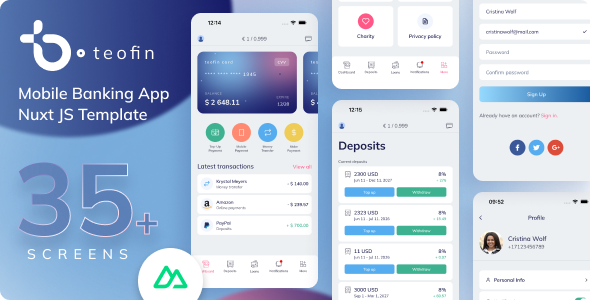
Teofin is a production-ready Nuxt 4 PWA mobile banking template built for fintech apps, digital banks, and personal finance tools. It comes with 40 screens, a complete payment and card management flow, deposits, loans, statistics with charts, exchange rates, invoice creation, and more — all in a clean, mobile-first design installable on iOS, Android, Mac, and Windows. Stop building from scratch. Launch your banking app in hours.
At a Glance
- Screens: 40 screens
- Framework: Nuxt 4 / Vue 3 + TypeScript
- PWA: Yes — installable
- State Management: Pinia
- Styling: SCSS
- Design File: Figma included
- Data: JSON mock (API-ready)
- Support: 6 months
- Updates: Free lifetime updates
Why Choose PWA?
- App-like Feel: Fast and smooth, no app store needed.
- Works Offline: Available anytime, even without internet.
- Fast & Responsive: Instant loading, great UX.
- Cross-Platform: One build for all devices.
- No App Store: Use it right from the browser.
Key Technical Features
- Nuxt 4 with Vue 3 and Vite
- TypeScript throughout (.ts / .vue)
- Composition API with <script setup>
- Pinia + pinia-plugin-persistedstate
- @vite-pwa/nuxt — offline support & installable
- Workbox — service worker & caching strategy
- @nuxt/image — automatic image optimization
- @nuxt/fonts — optimized Google Fonts
- SCSS variables — easy template customization
- motion-v — smooth animations
- Swiper — touch-friendly card carousel
- Chart.js — interactive finance charts
- Static JSON mock data — API-ready
- Modular architecture following Nuxt 4 conventions
- Figma source file fully editable
Key UI & Banking Features
- Dashboard with card carousel and recent transactions
- Card details and card menu screens
- Change PIN code flow
- Open new card screen
- Fund transfer between accounts
- IBAN payment flow
- Mobile payment screen
- Generic payment and top-up screens
- Create and send invoices
- Payment success & failed result screens
- ATM withdrawal screen
- Deposits list and open deposit flow
- Loans list and open new loan flow
- Moneybox (savings goal) screen
- Transaction history with detailed transaction pages
- Statistics with interactive Chart.js charts
- Exchange rates screen
- Notifications center
- User profile and edit personal info
- Sign In, Sign Up, phone verification, OTP confirmation
- Forgot Password and set new password flow
- FAQ and Privacy Policy screens
Requirements
- Node.js — 18.x or higher
- Package manager — npm 9+ or pnpm 9+
- Knowledge — Basic Vue / Nuxt experience recommended
Browser & Device Compatibility
- Browsers: iOS Safari, Chrome, Firefox, Edge, Samsung Internet
- Installable PWA: iOS, Android, macOS, Windows
Technologies Used
- Nuxt 4 — full-stack Vue framework with file-based routing
- Vue 3 — Composition API with <script setup> syntax
- TypeScript — strongly typed throughout all .ts and .vue files
- Pinia + persistedstate — global state management with local storage persistence
- @vite-pwa/nuxt — PWA integration for offline support and home screen installation
- Workbox — service worker with smart caching strategies
- @nuxt/image — automatic image optimization and lazy loading
- @nuxt/fonts — optimized Google Fonts loading with zero layout shift
- motion-v — smooth, declarative animations for Vue 3
- Swiper — touch-friendly card carousel
- Chart.js — interactive charts for financial statistics
- SCSS — modular styles with variables for easy template customization
- Mulish — clean geometric sans-serif font for modern UI
What You’ll Get After Purchase:
- Complete Source Code – Clean, well-organized Nuxt 4 PWA project
- Step-by-step Documentation – For easy setup and usage
- Figma Design File – Fully editable source design for all 40 screens
- 6 Months of Support – Help with setup, bugs, and general questions
- Free Lifetime Updates – All future improvements included at no extra cost
Easy Setup
- Download and unzip the project
- Run
npm installto install dependencies - Run
npm run devand openhttp://localhost:3000in your browser - Replace static JSON mock data with your own backend API — done!
Perfect For
- Fintech Startups — launch a professional mobile banking app quickly
- Digital Banks & Neobanks — deliver a polished financial product experience
- Personal Finance Apps — budgeting, savings, and expense tracking projects
- Freelancers & Agencies — deliver polished client fintech projects without building from scratch
- Developers — learn Nuxt 4, Vue 3, and PWA best practices with a real-world example
FAQ
Q: Can I connect this to a real backend?
A: Yes. All data comes from static JSON files — easy to replace with any REST or GraphQL API.
Q: Is the Figma file fully editable?
A: Yes, the fully editable Figma source file covering all 40 screens is included with your purchase.
Q: Does this work on iOS and Android?
A: Yes. As a PWA, it installs directly from the browser on iOS, Android, Mac, and Windows — no app store required.
Q: Do I need Nuxt experience to use this?
A: Basic Vue/Nuxt knowledge is enough. The code is clean and structured, and step-by-step documentation is included.
Q: Can I use this for a client project?
A: Yes. A Regular License covers one end product. For multiple clients or SaaS use, an Extended License is required.
Changelog
v1.0.0 — Initial Release (June 2026)
- 40 screens — complete mobile banking flow
- PWA support with offline mode and service worker
- Cards, payments, deposits, loans, moneybox, statistics, exchange rates
- Figma source file for all 40 screens included
About Us
We provide a full range of services — mobile and web app development, and UI/UX design. Whether you have a ready-made design or need one from scratch, reach out via the links below. We’re here to bring your ideas to life.
Discover What We’ve Built







Need Help?

