
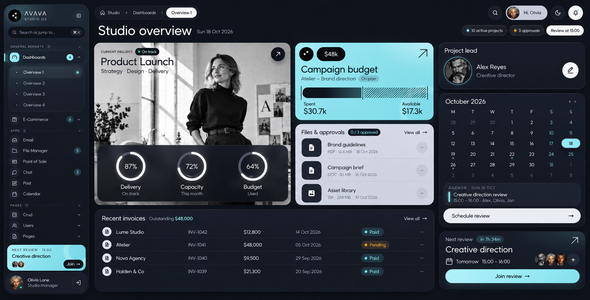
Avava Studio OS – Admin Dashboard HTML Template
Avava Studio OS is a complete admin dashboard HTML template built for creative studios, design and photo agencies, production teams and freelancers who run real client work. It ships 132 pages in a calm dark theme and a matching light theme: four dashboards, a full e-commerce section, six working apps, user and account pages, a blog, invoices, authentication, wizards and a large library of components, forms, tables, charts and maps. Everything is written in plain HTML, CSS and JavaScript. There is no framework, no jQuery and no build step: open index.html and the template works, even straight from your disk.
Most admin templates show static screenshots of a dashboard. Avava Studio OS behaves like a product. Filters filter, tables sort and paginate, forms validate, wizards remember their steps, drag and drop moves real items, and the calendar, inbox, chat and point of sale respond to every click. Dates are relative to today, so the demo never looks out of date. When you start building, you begin from screens that already work instead of drawings you still have to wire up.
Four dashboards for a studio that runs on projects
The Studio overview brings the current project, the campaign budget, files waiting for approval, recent invoices, the project lead, a live calendar, the next review and a studio report onto one screen. Overview 2 covers sales and performance: profit, revenue against expenses, the monthly goal, client sources, a funnel, top clients, team workload, payments and regions. Overview 3 is about clients and geography, with a world client map, new and returning clients, industries, a call planner across time zones, satisfaction and retention. Overview 4 follows production: a project timeline, the pipeline, team capacity, time tracking, client approvals, this week’s deadlines and project profitability.
Apps that actually work
The Email app is a team inbox with folders, labels, threads, attachments, client context and a compose window with templates and scheduling. Chat has channels, direct and client conversations, files, approvals, reactions, threads and pins. The File Manager shows storage by type, collections, a table or grid with bulk actions, versions, access, activity and real file upload. The Calendar offers month, week and day views with drag-to-move and conflict checks. Point of Sale is a full in-store register with a searchable catalog, sizes and stock, member discounts, promo codes, card, cash or split payment, holds and refunds. Post is a content planner with scheduled posts, a content calendar, client approvals and channel previews.
E-commerce, users, invoices and pages
The e-commerce section covers categories, adding a product, product list and grid, transactions, sellers and reviews. User and account pages include profiles, teams, projects, connections, security, billing and plans, and notification settings. Invoices can be listed, previewed, edited and created in three guided steps with a live preview. You also get a blog with a post editor, pricing, FAQ, error, maintenance, coming soon and not authorized pages, six authentication screens and three complete wizards: checkout, property listing and deal creation.
A component library you can copy from
Every component page is a working showcase with a playground, real states and ready-to-use examples. You get cards, accordions, alerts, badges, buttons, carousels, dropdowns, modals, navbars, offcanvas panels, pagination and breadcrumbs, progress, spinners, tabs, toasts, tooltips and typography. Extended UI adds avatars, block UI, drag and drop, a media player with a real video, custom scrollbars, star ratings, alerts in the SweetAlert2 style, text dividers, timelines, product tours and a treeview. Forms include inputs, selects, checkboxes and radios, custom option cards, switches, sliders, date pickers, file upload and rich text, Markdown and code editors, all written without extra libraries, plus vertical, horizontal and sticky-action layouts, three form wizards and validation.
Tables, charts and maps
Datatables come in five flavours: basic, advanced with filters, row grouping, in-place editing like a spreadsheet, and extensions with export to Copy, CSV, Excel, PDF and Print, column visibility, ordering, resizing and pinning, row reordering and virtual scrolling over thousands of rows. Charts are drawn as SVG by the template itself: line and area, bar, pie and donut, radar, mixed and sparklines. The maps page uses Leaflet with dots, pins, bubbles, clustering, a client list in sync with the map and a location picker.
Built with care
- Dark and light themes with one switch; the choice is remembered on every page
- A collapsible sidebar with three menu levels and instant page search on Cmd / Ctrl + K
- Responsive from 320 px phones to 2560 px screens, with no horizontal scrolling
- Semantic HTML, keyboard support, visible focus, a skip link and reduced-motion support
- Valid HTML and CSS according to the W3C validators, and no console errors
- Design tokens for colours, so one change restyles every page
- Line icons (Lucide), filled icons (Phosphor) and Font Awesome Free included
- Original photos, portraits and video created for this template and licensed with it
- Detailed English documentation with the full page list, setup and customisation notes
What you get
The download contains the template with all 132 HTML pages, the stylesheet with a table of contents, a commented JavaScript file for every interactive page, the images and the video, and the documentation. All photos, portraits and the video were created by the author with AI tools and are licensed to you for use in this template and in the end product you build with it.
Note: Avava Studio OS is an HTML template. It does not include a back end, a database or server-side code; connect it to the API or framework of your choice.
All 132 pages
General reports
- Dashboards: Overview 1, Overview 2, Overview 3, Overview 4
- E-Commerce: Categories, Add Product, Products › Product List, Products › Product Grid, Products › Project Grid, Transactions › Transaction List, Transactions › Transaction Detail, Sellers › Seller List, Sellers › Seller Detail, Reviews
Apps
- File Manager
- Point of Sale
- Chat
- Post
- Calendar
Pages
- Crud: Data List, Form
- Users: List, View › Account, View › Security, View › Billing & Plans, View › Notifications, View › Connections
- Pages: User Profile › Profile, User Profile › Teams, User Profile › Projects, User Profile › Connections, Account Settings › Account, Account Settings › Security, Account Settings › Billing & Plans, Account Settings › Notifications, Account Settings › Connections, Update Profile, Change Password, Blog › Blog List, Blog › Blog Detail, Blog › Write Post, Misc › Error, Misc › Under Maintenance, Misc › Coming Soon, Misc › Not Authorized, FAQ, Pricing
- Invoice: Invoice List, Preview, Edit, Add
- Authentications: Login, Register, Verify Email, Reset Password, Forgot Password, Two Steps
- Wizard Examples: Checkout, Property Listing, Create Deal
- Modal Examples
Components
- Cards: Basic, Advanced, Statistics, Analytics, Actions
- User interface: Accordion, Alerts, Badges, Buttons, Carousel, Collapse, Dropdowns, Footer, List Groups, Modals, Navbar, Offcanvas, Pagination & Breadcrumbs, Progress, Spinners, Tabs & Pills, Toasts, Tooltips & Popovers, Typography
- Extended UI: Avatar, BlockUI, Drag & Drop, Media Player, Perfect Scrollbar, Star Ratings, SweetAlert2, Text Divider, Timeline › Basic, Timeline › Fullscreen, Tour, Treeview, Miscellaneous
- Icons: Line icons, Filled icons, Font Awesome
Forms & tables
- Form Elements: Inputs, Selects, Checkboxes & Radios, Custom Options, Editors, Switches, Extras, Date Pickers, Sliders, File Upload
- Form Layouts: Vertical, Horizontal, Sticky Actions
- Form Wizard: Numbered, Icons, Vertical
- Form Validation
- Tables
- Datatables: Basic, Advanced, Row Grouping, Editable, Extensions
Charts & maps
- Charts: Line & Area, Bar, Pie & Donut, Radar, Mixed, Sparklines
- Leaflet Maps