
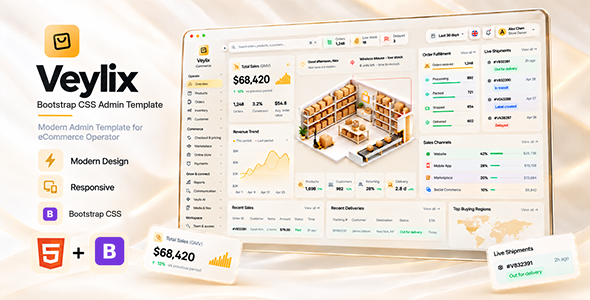
Veylix — Bootstrap HTML eCommerce Admin Dashboard
Veylix is a modern, responsive eCommerce operations admin dashboard built with Bootstrap 5.3.8, custom CSS and editable SCSS, and Vanilla JavaScript. The ready-to-use HTML pages require no framework build step. It is designed for stores, commerce teams, marketplaces, inventory operations, order management, reporting, customer workflows, and scalable admin applications.
The interface combines a distinctive warm glass-inspired visual system with practical commerce workflows, reusable components, structured demo data, direct HTML navigation, responsive layouts, and a buyer-friendly source structure.
Why Veylix?
- Modern eCommerce-focused dashboard design with a premium warm-neutral interface.
- 100 ready-to-use HTML pages, including dedicated product create/edit workflows and commerce workspaces.
- Bootstrap 5.3.8 + modular SCSS, with compiled CSS included for immediate use and optional Sass compilation for customizations.
- Vanilla JavaScript for browser-ready interactions — no React, Next.js, jQuery, npm, or Vite runtime required.
- Responsive layout for desktop, tablet, and mobile screens.
- Direct HTML page navigation with easy-to-host links such as
index.html,products.html, andorders.html. - Reusable Veylix UI patterns, organized JavaScript files, compiled styles, and editable SCSS partials for customization.
- Self-hosted Manrope font and local interface assets.
- Interactive dashboard charts, Phosphor Icons, and an SVG world map.
- Five interface languages with Arabic RTL support.
- General branding settings for browser title, favicon, sidebar logo, main logo, store information, and contact details.
- Optional AI-assisted demo workflows; connected AI generation and transcription can be integrated through your own secure backend endpoints.
Overview Dashboard
Veylix includes a complete commerce operations overview with realistic data presentation and operational insights, including:
- Total sales / GMV summary
- Revenue trend visualization
- Order fulfillment progress
- Live shipment status
- Sales channel performance
- Products, customers, returning customer rate, and delivery metrics
- Recent sales and recent deliveries
- Top buying regions
- Top products
- Inventory status and low-stock alerts
- Payment method distribution
- Quick commerce actions
Catalog & Product Management
- Products
- Product create and edit workflows
- Variants and options
- Categories
- Attributes
- Brands
- Collections
- Tags
- Reviews
- Product images and gallery management
- Pricing, stock, and SEO fields
Orders & Operations
- Orders
- Fulfillment
- Returns
- Refunds
- Cancellations
- Abandoned checkouts
- Customers and customer segments
- Operational activity workflows
Inventory Management
- Inventory and stock
- Warehouses
- Transfers
- Replenishment
- Stock adjustments
- Suppliers
- Low-stock monitoring
Commerce & Pricing
- Checkout and pricing
- Payment methods
- Coupons and discounts
- Promotions
- Gift cards
- Campaigns
- Store channels
Marketplace
- Vendors
- Vendor applications and approvals
- Vendor orders
- Commissions
- Payouts
- Disputes
Online Store Content
- Navigation
- Pages
- Blog
- Testimonials
- Contact messages
- Popups
- FAQs
Reports & Analytics
- Sales reports
- Order reports
- Product reports
- Inventory reports
- Customer reports
- Return reports
- Channel reports
- Payment reports
- Vendor reports
- Marketing reports
Communication
- Unified inbox
- Support tickets
- Email drafts
- Email templates
- Notifications
AI Workspace
Veylix includes optional frontend AI-assisted workflow interfaces for:
- Product copy drafting
- SEO drafting
- Support drafting
- Catalog review
- Voice and image context
- Knowledge, prompts, rules, and usage history
Local template-response AI workflows work without an external provider. To enable connected AI generation or transcription, integrate your own secure server endpoints (for example, /api/ai/generate and /api/ai/transcribe). A production AI service or provider account is not included.
Workspace & Administration
- Media and files
- Users
- Roles
- Permissions
- Teams
- Audit activity
- Integrations
- Webhooks
- Settings
General Settings & Branding
The General Settings area allows buyers to customize common branding values directly from the interface:
- Store name
- Browser / tab title
- Favicon
- Sidebar logo
- Main site logo
- Tagline
- Support email
- Phone
- Address
Built-in default Veylix branding is included, and custom demo branding can be restored to the defaults when removed.
Responsive & Accessible
- Responsive desktop, tablet, and mobile layouts
- Responsive table handling
- Keyboard focus handling
- Semantic tables and labelled form fields
- Dialog semantics
- Skip navigation support
- Reduced-motion support
- Reduced-transparency preference support
- Arabic RTL layout support
Technology Stack
- Bootstrap 5.3.8 (local CSS and JavaScript bundle)
- Custom CSS + modular SCSS (compiled stylesheet included)
- Vanilla JavaScript (direct HTML runtime)
- Browser-native dashboard visualizations
- Phosphor Icons
- Manrope Variable Font
- SVG world map
- LocalStorage and IndexedDB for demo records, preferences, and media
Buyer-Friendly Source Structure
index.html                  Overview dashboard
products.html / orders.html  Direct application pages
assets/css/bootstrap.min.css  Bootstrap framework styles
assets/css/style.css         Compiled Veylix custom styles
assets/scss/style.scss       Editable SCSS entry point
assets/scss/                 Modular SCSS partials
assets/js/                   Shared and page-specific JavaScript
assets/fonts/                Self-hosted Manrope font
assets/images/               Local images, icons, and favicon
documentation.html           Setup and customization guide
licenses/                    Third-party notices and asset policy
Direct HTML Navigation & Deployment
Veylix uses standard .html links and is ready for static hosting, including cPanel/Apache and other static web servers. No router rewrite configuration or frontend build process is needed. Serving the files over HTTP is recommended for reliable browser storage behavior.
- Overview:
index.html - Products:
products.html - Orders:
orders.html - Product editing:
product-editor.html?id=products-1
Easy to Customize
HTML pages, JavaScript behavior, Bootstrap vendor files, compiled CSS, and editable SCSS are organized into clear folders. To customize the visual system, edit the modular partials in assets/scss/ and optionally compile assets/scss/style.scss into assets/css/style.css. The included compiled CSS works immediately without Sass, npm, or a build step.
Veylix uses the official Bootstrap framework alongside its own custom SCSS component styles to retain its distinctive design; not every interface element uses the default Bootstrap component markup.
What You Get
- 100 directly usable HTML application pages
- Bootstrap 5.3.8 CSS and JavaScript bundle
- Compiled CSS plus editable modular SCSS source
- Vanilla JavaScript page interactions and demo workflows
- Dedicated product create/edit workflows
- Documentation
- Third-party license notices
- Default Veylix favicon and logo assets
- AI workspace interfaces with optional secure API integration points
- Static-host-friendly direct
.htmlpage navigation
Important Note
Veylix is a frontend admin template. Demo commerce records and demo settings are stored in browser storage. Production authentication, authorization, payment processing, external messaging, durable database storage, and third-party service credentials must be connected to your own backend.
Preview-only warehouse and product artwork is not included in the buyer download. Neutral placeholder assets are supplied in the downloadable package so you can replace them with your own licensed content.
Credits
- Manrope — SIL Open Font License 1.1
- Phosphor Icons — MIT License
- @svg-maps/world — CC BY 4.0 (attribution required)
- Bootstrap 5.3.8 — MIT License
Veylix — Bootstrap HTML eCommerce Admin Dashboard
Modern commerce operations, clean architecture, responsive layouts, and a polished interface — ready to customize for your next eCommerce admin project.